
Dynamic PDP stories
Product specific videos that boost conversion.
Explore all capabilities



































Share your founder story and spotlight your brand's unique personality or welcome your visitors and turn your visitors into customers.
Get Tolstoy for freeViewers respond to your Tolstoys with choices, text and video messages, contact information, and more. Each response is a way for you to deeply understand your market and tailor your messaging.
Get Tolstoy for free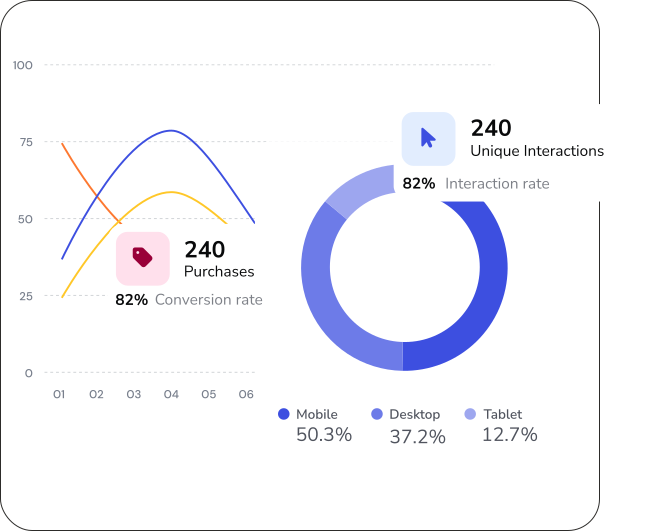
Give your customers answers to the most important questions before they even ask and help them understand why this is the product they are looking for.
Get Tolstoy for freeSee how it's gonna look like
Product specific videos that boost conversion.
Explore all capabilities
Surface dynamic content and get visibility to the assets' performance.
Explore all capabilities
Drive product discovery by featuring videos of similar products.
Explore all capabilities
Build brand connection and drive product discovery.
Explore all capabilities
Hero videos that load fast, look great, and drive action instantly.
Explore all capabilities
Like TikTok, but for your brand—personalized to drive engagement, scrolls, and clicks.
Explore all capabilities
Highlight new products and promos with branded videos automatically distributed across your collection pages.
Explore all capabilities
Highlight new products and promos with branded videos automatically distributed across your collection pages.
Explore all capabilities
Bridge the gap from scroll to shop with video-based landing page built for social traffic.
Explore all capabilities
Showcase all your video content in one place—on your site, where it converts.
Explore all capabilities
Win back shoppers with personalized product videos in cart and browse abandonment emails.
Explore all capabilities
Put top-performing videos to work across every campaign.
Explore all capabilities
Mobile-optimized videos on PDPs that drive in-app engagement and conversion.
Explore all capabilities
Seamless integration through your app provider or our plug-and-play SDK
Explore all capabilitiesInteractive videos let viewers engage with your content through choices, responses, and actions. Instead of passively watching, customers can answer questions, navigate to different video paths, submit contact information, or respond with text and video messages.
Shoppable videos and interactive videos serve different purposes in the customer journey.
Key differences:
Many brands use both together to cover different parts of the customer journey.
Interactive videos work for any situation where you want customers to engage rather than just watch.
Common use cases:
Learn more about video quizzes.
Every interaction is a data point. When viewers respond to your videos with choices, text messages, video replies, or contact information, you learn what they care about and where they are in their buying journey.
What you can capture:
This data helps you tailor messaging, improve products, and build customer profiles.
Yes. You can create FAQ videos that address common questions before customers need to ask. Structure your video with branching paths so customers select the question they have and get an immediate video answer. This reduces support tickets, builds confidence, and moves customers closer to purchase.
Tolstoy automatically distributes the right videos to the right pages, across channels, at scale.
Supported placements:
Learn more about Tolstoy for eCommerce.
Customers buy from brands they trust. Founder videos put a face to your business and share the story behind your products. This builds emotional connection, differentiates you from competitors, and gives customers a reason to choose you beyond price and features.
Learn how to write a founder's story that stands out.
No. Tolstoy uses lazy loading, deferred video delivery, and a sub-50KB JavaScript payload to ensure zero impact on Core Web Vitals. Videos only load when customers interact with them, not on initial page load.
Yes. Tolstoy supports multiple response types that turn passive viewers into active participants.
Response options:
All responses are collected in your Tolstoy dashboard for review and follow-up.
Learn more about Tolstoy's integrations.
Tolstoy tracks engagement and conversion at every level so you can see exactly how customers interact with your content.
Metrics you can track:
Add shoppable videos to your website and Shop app today